Uptime Snooper2.11
Continue to app
Free Version
Publisher Description
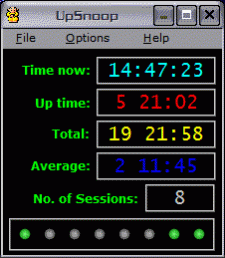
Put this program into your Startup folder (or install as an NT service) and it will keep track of your system uptime. It shows the current session uptime, total and average. Sessions are also logged into a text file.
Additionally, Upsnoop will monitor the status of up to five selected programs, optionally restarting these which are not running.
For system administrators and the users who lke to know more about their system.
About Uptime Snooper
Uptime Snooper is a free software published in the Other list of programs, part of System Utilities.
This program is available in English. It was last updated on 29 September, 2026. Uptime Snooper is compatible with the following operating systems: Windows.
The company that develops Uptime Snooper is J. Andrzej Wrotniak. The latest version released by its developer is 2.11. This version was rated by 1 users of our site and has an average rating of 4.0.
The download we have available for Uptime Snooper has a file size of N/A. Just click the green Download button above to start the downloading process. The program is listed on our website since 2006-10-25 and was downloaded 269 times. We have already checked if the download link is safe, however for your own protection we recommend that you scan the downloaded software with your antivirus. Your antivirus may detect the Uptime Snooper as malware if the download link is broken.
How to install Uptime Snooper on your Windows device:
This program is available in English. It was last updated on 29 September, 2026. Uptime Snooper is compatible with the following operating systems: Windows.
The company that develops Uptime Snooper is J. Andrzej Wrotniak. The latest version released by its developer is 2.11. This version was rated by 1 users of our site and has an average rating of 4.0.
The download we have available for Uptime Snooper has a file size of N/A. Just click the green Download button above to start the downloading process. The program is listed on our website since 2006-10-25 and was downloaded 269 times. We have already checked if the download link is safe, however for your own protection we recommend that you scan the downloaded software with your antivirus. Your antivirus may detect the Uptime Snooper as malware if the download link is broken.
How to install Uptime Snooper on your Windows device:
- Click on the Download button on our website. This will start the download from the website of the developer.
- Once the Uptime Snooper is downloaded click on it to start the setup process (assuming you are on a desktop computer).
- When the installation is finished you should be able to see and run the program.
Program Details
System requirements
Operating systems
Win95,Win98,WinME,WinNT 4.x,Windows2000,WinXP
Download information
File size
N/A
Total downloads
269
Pricing
License model
Free
Price
Version History
Here you can find the changelog of Uptime Snooper since it was posted on our website on 2015-04-28. The latest version is 2.11 and it was updated on Soft112 on 29 September, 2026. See below the changes in each version:
version 2.11
posted on 2006-10-25
More watched programs; adjustable time display format.
